Drag Bike 201m – Play Online in Your Browser
NIGHT STRIP
Motorcycle drag racing on a 201-meter night strip
Launch on green, shift at the right RPM, and spend your one NOS burst to catch the other lane. Race on a phone or computer.
Looking for the Sunmori app? Open Google PlayA 201-meter drag sprint in your browser
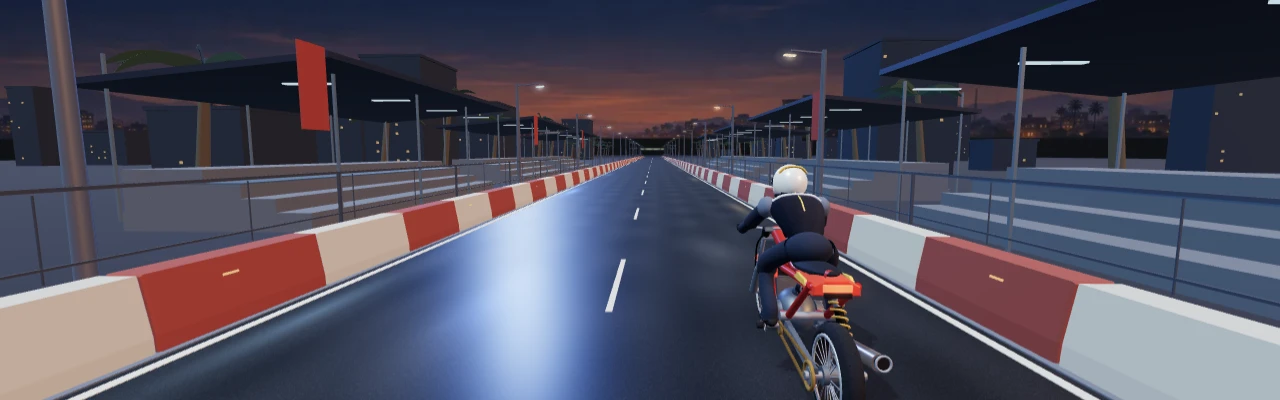
Night Strip puts a compact drag bike on a closed two-lane course after dark. The 3D chase camera stays behind your rider so you can see the strip, the finish gantry, and the rival alongside you. Every race asks you to make three decisions: when to launch, when to shift if you ride manual, and when to use your single nitrous burst. Finish the 201 meters and you get a timed result, a reaction split, and an instant rematch option.
Press Play now to open the cockpit and Stage race to begin the countdown. The bike accelerates automatically once it launches. You can use a touch screen, mouse, or keyboard. On a phone, the race view stays tall in portrait mode and the two main controls sit below it. The Fullscreen control expands the player in supported browsers. Engine sound follows the tachometer, and the note button toggles it.
How to race Drag Bike 201m
Wait for green
Three red lights illuminate in sequence. The final gap varies, so watch the lights and press GAS as soon as the green lamp appears. An early press or slow reaction incurs a 0.300-second penalty. If you miss the light entirely, the bike auto-launches with the penalty and you can finish the run. Your elapsed time includes the reaction after green.
Shift with the RPM bar
Auto shift gets you through all five gears while you learn the launch and nitrous timing. Select Manual shift before staging to control each gear change yourself. When the tachometer enters the green band from 9,000 to 11,000 RPM, press Shift up. You can also swipe up on the race view. A perfect shift increases your speed by 3% at the gear change. A rushed shift can bog the bike down, and sitting on the limiter costs acceleration. Fifth gear carries you through the rest of the sprint.
Spend nitrous once
The NOS button gives you one burst per race. Its outline lights up at 105 meters when the stronger late-race burst becomes available. Fire with enough strip left to benefit before the finish. Try an early burst and a late burst on separate runs with a similar start. The result screen makes it easy to see how much the timing changed your finish.
On a keyboard, focus the game and use Space, K, or Up Arrow to stage, launch, and shift. Use N or Shift for nitrous.
Four ways to run the strip
Quick Duel puts a computer rival in the other lane. The rival's finish time varies between attempts, so watch the split in the results. Practice leaves the other lane open for learning the lights and gear timings. When you can launch cleanly several times in succession, switch to manual and learn to read the green band.
Time Attack brings back a ghost of your own best run on the current transmission. Finish a run to establish a record, then see where the ghost gains ground. Career has four opponents. Beat Nara, Banyu, Sinta, and Aksa in order. You can retry the same opponent until you win. Progress is saved on this browser along with your personal times and settings.
Choose a livery before the race
Pick Ember Red, Cobalt Blue, Jade Green, or Graphite in the cockpit. The frame, bodywork, helmet, and suit change together. All liveries use the same engine and timing rules. The full 3D scene uses WebGL. A lighter scene is available automatically if the browser can't start the 3D renderer.
Compare your finish
The result screen shows your time to the thousandth and the number of perfect shifts. Quick Duel and Career add your opponent's time. Look at the reaction split first if you are losing ground straight away. A clean launch is a repeatable improvement. Once the opening is consistent, compare your shift count and the point where you hit NOS. Auto and manual use separate records, so each time gives you a fair reference for the way you raced.
Night Strip is an original browser game on an unofficial fan site. The installed Drag Bike 201m Sunmori app is developed by Mari Berkembang and linked in our official Android guide. Its developer lists a longer drag strip, circuit racing, a city free ride, and bike customization alongside the 201-meter race. See the Sunmori guide for the riding culture behind the name.
Frequently asked questions
Can I play Drag Bike 201m on my phone?
Yes. Open the web player and tap Stage race. Touch controls work in portrait or landscape.
Do I need to download anything to play?
You can play Night Strip for free in the browser without an account or an app installation.
When should I use NOS?
The stronger burst becomes available at 105 meters. Watch for the highlighted button, and use it with enough track left to accelerate.
How does manual shifting work?
Select Manual shift and tap Shift up when the tachometer is in the green band between 9,000 and 11,000 RPM. You can also swipe up on the course view.
Where does the game save my results?
Personal times, the ghost trace, Career progress, and settings are saved in browser storage when available.
Player discussion